
Bohemian Coffee House: a coffee data model in a Shopify theme
Bohemian Coffee House is a family café and roastery in Rumburk, northern Czechia. Its rebrand came with a new Shopify store, designed by Zdeněk Zeman and built by the Appfleece agency team. In that team I worked on the theme and on how the store handles coffee data.
- Client
- Bohemian Coffee House
- Industry
- Speciality coffee, café and roastery
- Platform
- Shopify, Motion theme moved to Online Store 2.0
- Languages
- Czech, English, German
- Launch
- April 2026
- Team
- Appfleece, design by Zdeněk Zeman
- My role
- Theme and data model, Appfleece team
Starting point
The roastery sells coffees from several countries and roasts most of them both light and dark. Customers choose by how they brew at home, where the coffee comes from and how it was processed. The roastery also needs to add new coffees itself, without a developer.
If that information only lived in the product description, nobody could filter by it or show it consistently. Every coffee needed a structured record.
The project in the Appfleece team
- Rebrand and new storeDesign by Zdeněk Zeman, build by the Appfleece team.
- Online Store 2.0The Motion theme moved to sections, so the client edits the café, roastery and about pages itself.
- 19 fields per coffeeOne admin record feeds the scales, filters, cards and labels.
- Mobile layoutTwo columns of coffees, collapsible filters and larger variant buttons.
- Three languagesCzech, English and German, including the scales and brew guides.
- ShippingZ-BOX pickup chosen in the cart via Appfleece’s Globe app, and Packeta labels inside Shopify.
The scope of the whole project comes from Appfleece’s public reference and the live site. My own share is described separately below. Source: Appfleece reference: Bohemian Coffee House (checked 7 Nov 2026).
My contribution
- Shopify theme development.
- The coffee data model: each coffee’s details stored as product metafields, from country and region through process to flavour profile, roast level and acidity.
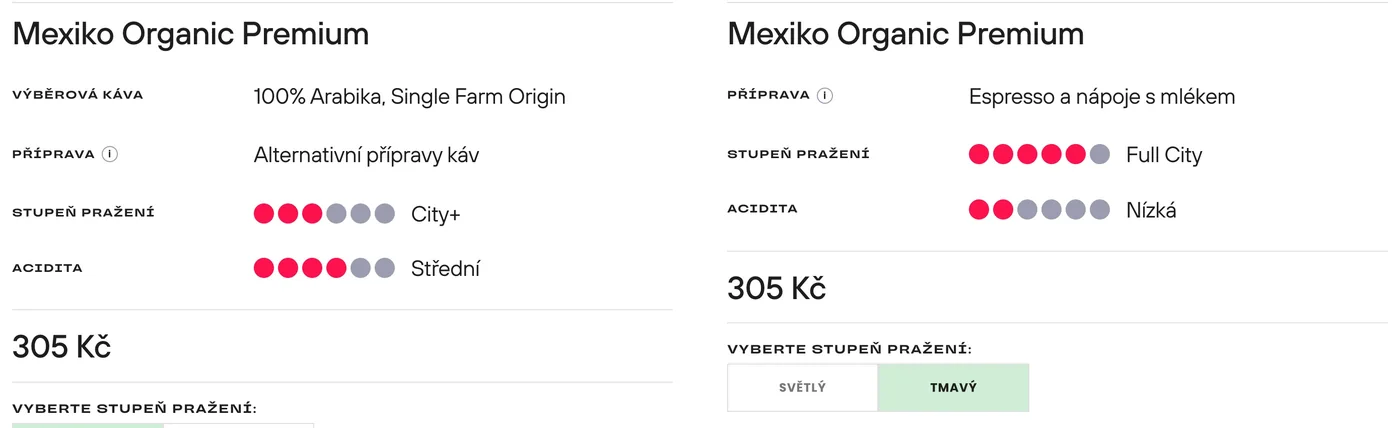
- Roast and acidity scales on the product page, rendered straight from those fields.
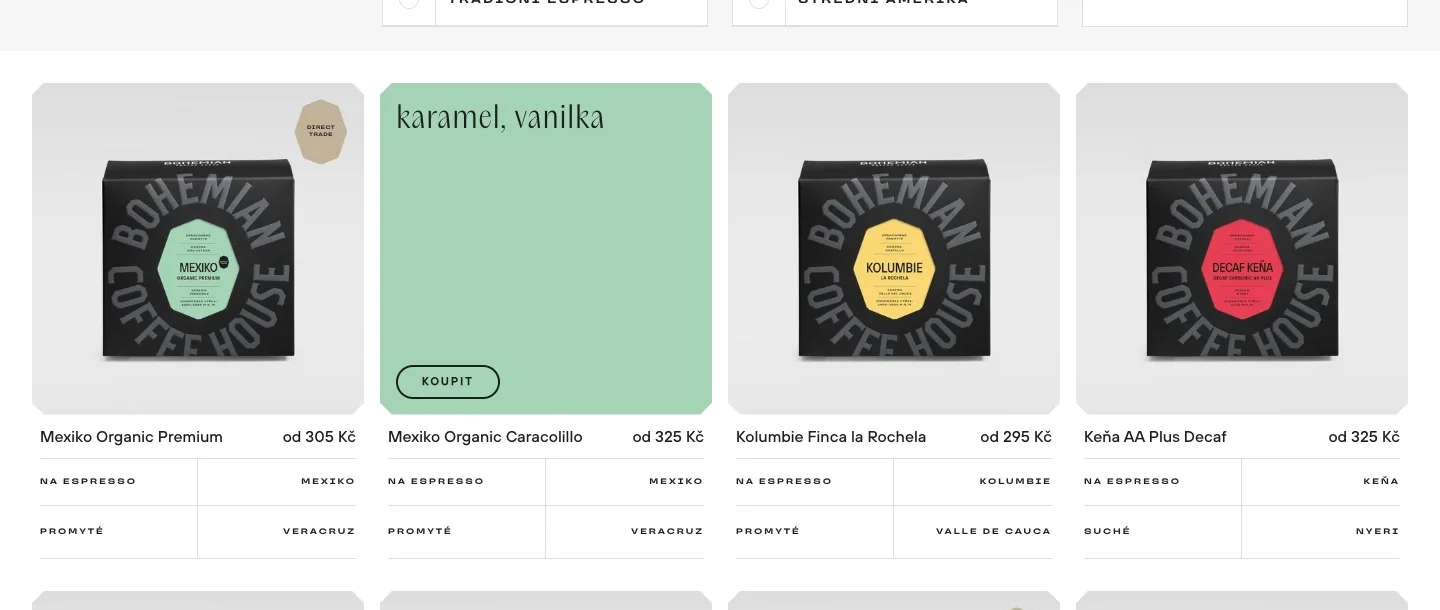
- Flavour profiles that appear on collection cards on hover.
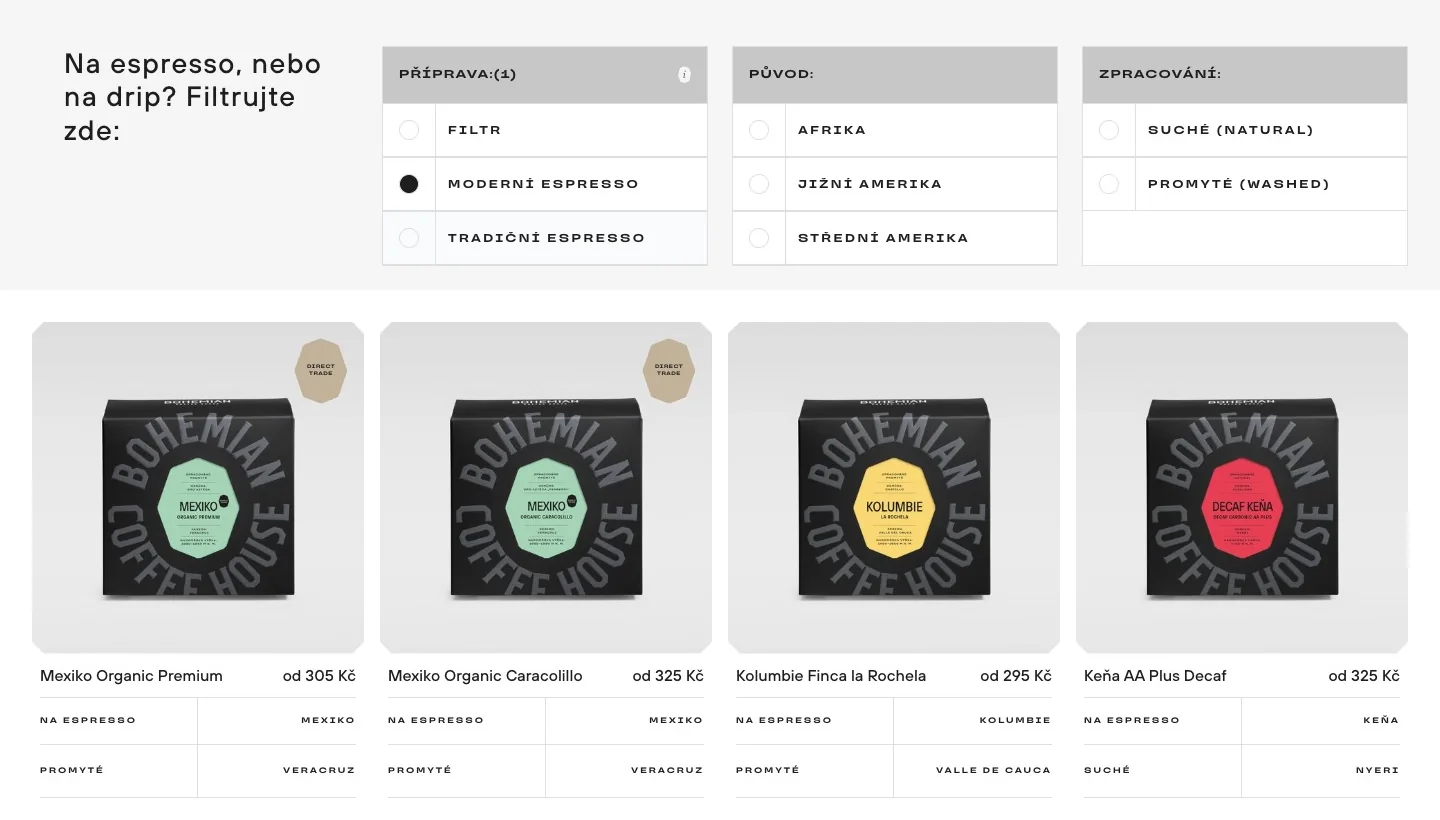
- Filters by brew method, origin and process, built on metafields.
- Linking the light and dark roast of the same coffee: two separate products with a shared roast switch.
How coffee data moves through the store
Coffee details are entered once in the admin and the store reuses them in several places. The metafield keys in the diagram are taken from the filter parameters on the live site.
custom.pripravaBrew method: filtercustom.zeme_puvoduOrigin: Central Americacustom.zpracovani-newProcess: washedRoast level · acidityCity · mediumFlavour profiledried fruit, orange, caramel, marzipan
- Collection filtersBrew method, origin and process without a page reload
- Product scalesSix points for roast and acidity
- Collection cardFlavour profile on hover
- Roast switchLight and dark versions as two products
Example: Mexiko Organic Caracolillo, light roast. The filter metafield keys are taken from the live site; other fields are named as they appear in the admin.
Working on something similar?
Send a short description of where the store is now and what it needs to do. I’ll go through it, ask what is missing and suggest a realistic next step.
I need a custom theme ↗︎Related articles
- Shopify Theme vs Custom Redesign: When to UpgradeHow to choose between a ready-made Shopify theme, custom sections and a broader redesign focused on mobile UX, performance and maintainability.→
- Shopify SEO: What Shopify Handles and What You ControlA practical Shopify SEO guide covering site structure, products, collections, metadata, images, robots.txt and Google Search Console.→
- How to Improve Shopify Store Speed and Core Web VitalsHow to measure and improve Shopify performance without chasing a single Lighthouse score or removing useful store features blindly.→